Best Medical Claims Processing Software: 7 Features to Look For in 2026
Medical claims can seem like a small administrative task — until rejected claims start piling up, payments are delayed and your team spends hours trying to work out what happened.
The best medical claims processing software does more than submit claims. It can help practices manage the journey from patient information and billing through to claim submission, responses, follow-up and payment.
For healthcare practices, choosing the right system can make a meaningful difference to administrative efficiency, visibility and cash flow.
But what should you actually look for when comparing different solutions?
Here are seven features worth paying attention to in 2026.
What Is Medical Claims Processing Software?
Medical claims processing software helps healthcare practices create, submit, track and manage claims sent to organisations such as insurers, funders or ACC.
Rather than relying heavily on manual administration, the software can bring different parts of the billing and claims process into a connected workflow.
Depending on the platform, this may include:
- Patient information
- Billing and invoicing
- Clinical and service information
- Claim submission
- Claim acceptance and rejection tracking
- Payment information
- Reconciliation
- Patient accounts
- Reporting
The important thing to remember is that not every billing system handles claims in the same way.
Some systems may support direct electronic submission and response information, while others may rely more heavily on separate processes.
For New Zealand practices, integration with the systems and services they actually use is particularly important. ACC, for example, supports electronic claims and invoicing through compatible practice management systems, as well as through ProviderHub.
That makes the claims functionality of your practice management software worth investigating carefully before you commit.
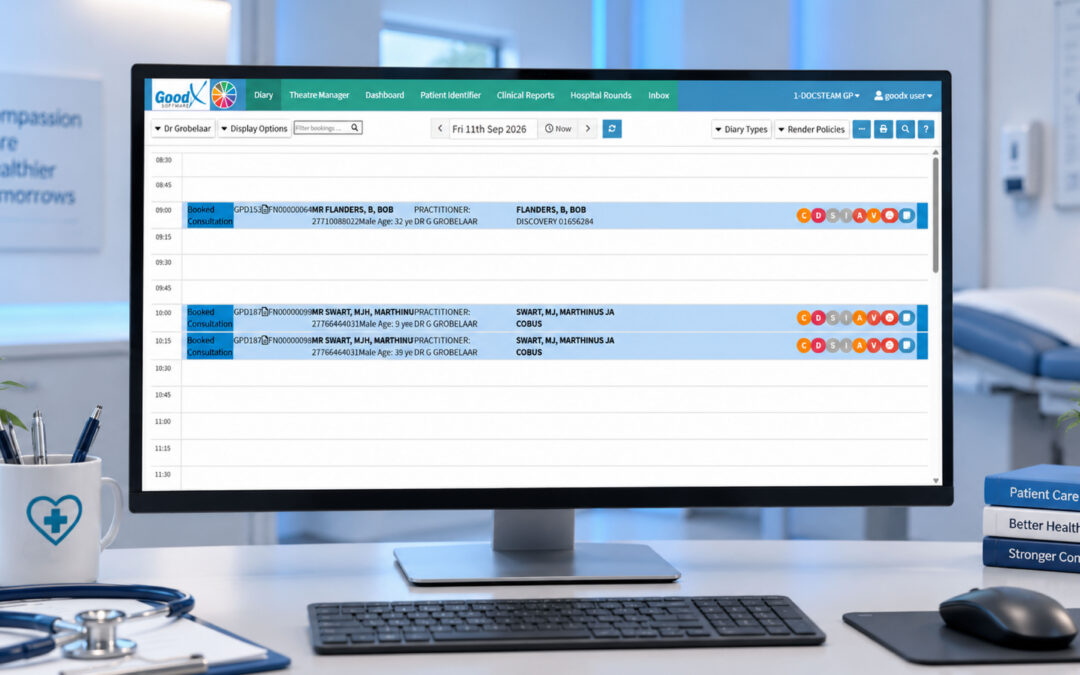
For practices considering an integrated approach, GoodX medical practice software brings clinical, administrative and financial processes together within a practice management system, allowing claims and billing to form part of the wider practice workflow rather than being treated as completely separate administrative tasks.
The important consideration is how that approach fits your practice. The claim types you process, the systems you need to integrate with and the way your team manages follow-up and reconciliation should all form part of the decision.
Why Faster Claims Processing Matters
Imagine two practices submitting similar claims on a Monday.
One practice receives an early response that something needs correcting. The team can investigate the issue while the relevant patient and consultation information is still readily available.
The other practice doesn’t discover the problem until later.
The claim itself hasn’t changed.
The difference is visibility and timing.
When claim information and responses are available sooner, practices can potentially:
- Identify problems earlier
- Correct information sooner
- Reduce outstanding claim backlogs
- Keep better track of unresolved claims
- Reduce unnecessary follow-up
- Improve visibility over expected payments
This doesn’t mean every claim will be processed instantly.
It means your team has a better opportunity to see what’s happening and act on it.
An integrated practice management system such as GoodX medical practice software can support this broader approach by keeping relevant clinical, administrative and financial information within the same workflow. The aim isn’t simply to process a claim faster, but to make it easier for staff to understand what happened before and after submission.
7 Features to Look for in the Best Medical Claims Processing Software
1. Electronic Claim Submission
One of the first things to investigate is how the software actually submits claims.
A system that supports electronic submission can reduce manual administration and give practices better visibility than a process that depends heavily on paper forms or separate systems.
In New Zealand, ACC states that providers can use their Practice Management System to lodge claims, send invoices and check claim or payment information, depending on the PMS functionality available.
When evaluating software, ask:
- How are claims submitted?
- Which organisations and claim types are supported?
- Is submission built into the PMS?
- How quickly are responses available?
- Can staff easily see unsuccessful claims?
- Can corrections be made without starting the entire process again?
The important thing isn’t simply whether a system says it supports electronic claims.
You need to know how that functionality works in your actual practice.
For a system such as GoodX medical practice software, this same question should be considered in the context of the wider practice workflow: how claim submission connects with the patient record, billing process and other information staff already use.
2. Accurate Billing and Coding Support
Claims depend on accurate information.
A good system should make it easier for practices to capture the right information and connect it to billing.
Manual re-entry creates opportunities for mistakes.
If clinical information, patient details and billing information are stored in completely separate systems, staff may have to enter the same information multiple times.
That creates unnecessary work.
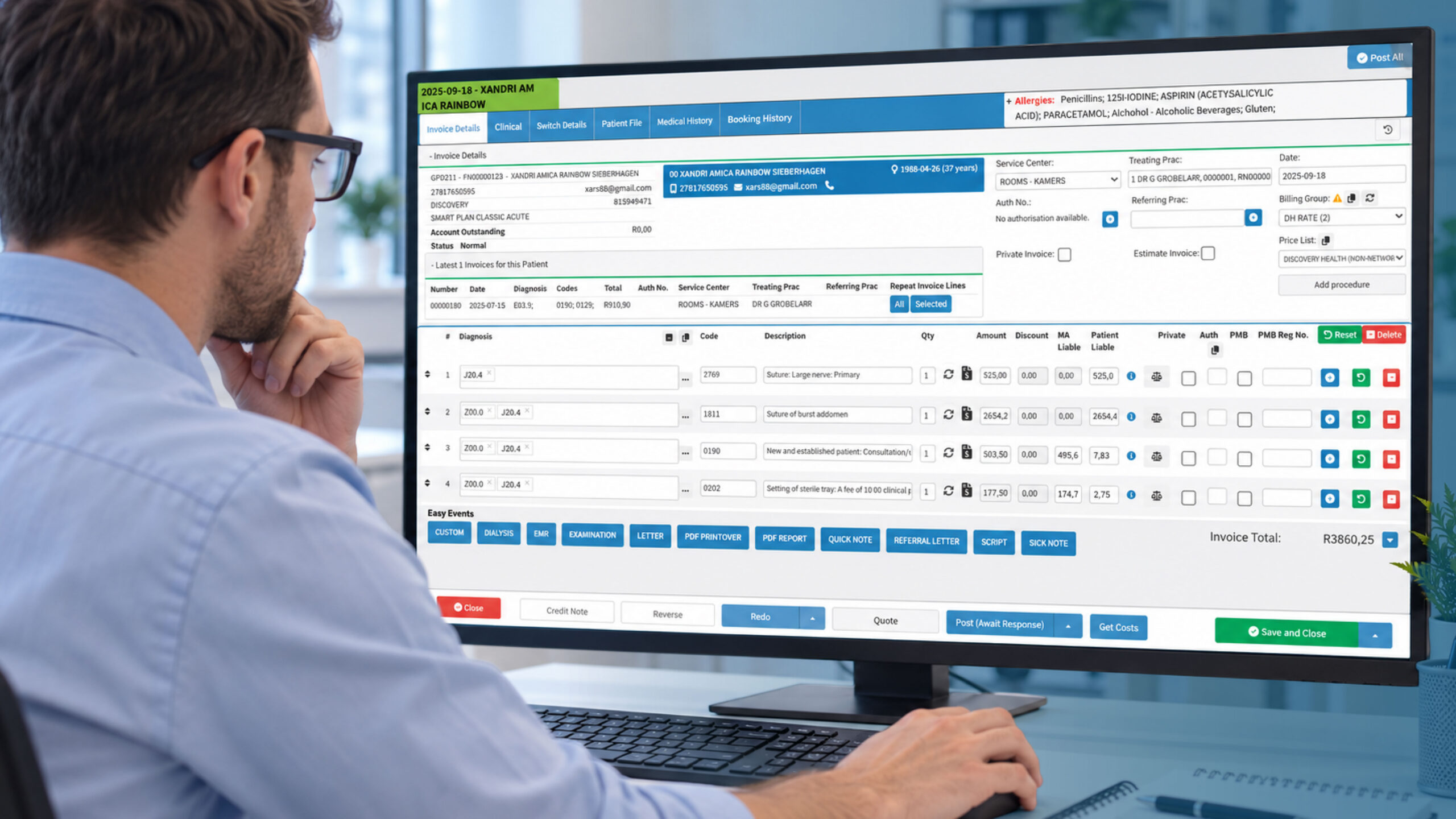
A stronger workflow connects relevant parts of the practice process so that information can move from:
Patient → Consultation → Service → Billing → Claim
When comparing software, consider whether it provides:
- Appropriate coding support
- Billing validation
- Service and charge information
- Fewer duplicate data-entry steps
- Clear links between clinical and financial information
- Support for the billing requirements relevant to your practice
This is one area where an integrated practice management platform can be useful. With GoodX medical practice software, clinical, administrative and financial workflows can sit within the same broader system, helping reduce unnecessary movement of information between separate applications.
The objective isn’t to find software with the longest list of coding features.
The objective is to make accurate billing easier.
3. Claim Rejection Management
Even a well-run practice will encounter claims that require attention.
The question is what happens next.
Without a structured process, claims that need correcting can end up in emails, spreadsheets, notes or individual staff members’ worklists.
That makes it difficult to know:
- What went wrong?
- Who is dealing with it?
- Has it been corrected?
- Was it resubmitted?
- Has payment been received?
Good claims processing software should make this information easier to find.
Useful functionality can include visibility into:
- Claims requiring attention
- Unsuccessful claims
- Claim responses
- Resubmitted claims
- Outstanding claims
- Payment information
The faster your team can identify a problem, the sooner they can decide what to do about it.
Rejection management shouldn’t be an afterthought.
When claims are connected to the wider billing and patient workflow, staff can also spend less time switching between systems to find the information needed to investigate an issue. That’s an important consideration when looking at platforms such as GoodX medical practice software alongside standalone claims solutions.
4. Patient and Claim Information Validation
A claim can run into problems because of incorrect or incomplete information.
That might involve:
- Patient details
- Provider information
- Claim information
- Service details
- Referral information
- Eligibility information
- Other required fields
Where appropriate checks can be built into the workflow, practices can identify potential problems earlier.
This matters because a small information error can create a much larger administrative chain reaction:
Incorrect information → Claim problem → Investigation → Correction → Resubmission → Delayed payment
Prevention is generally easier than correction.
The right software can help staff catch issues before they become another item on the follow-up list.
An integrated system can also make it easier to work from the information already captured during the patient and billing process. Rather than treating the claim as an isolated transaction, platforms such as GoodX medical practice software can bring the relevant practice information into a more connected workflow.
5. Payment and Remittance Reconciliation
Submitting a claim is only part of getting paid.
Practices also need to understand what happened after the claim was processed.
This is where reconciliation becomes important.
A useful system should help practices connect billing information with payments and identify differences that need attention.
For example:
- Which claims have been paid?
- Which claims remain outstanding?
- Were there differences between the billed and paid amounts?
- Does a patient balance remain?
- Which items require follow-up?
Without good reconciliation, information can become fragmented.
The practice may know a claim was submitted.
It may know a payment was received.
But connecting those two pieces of information can still require manual work.
Good claims software should help close that gap.
This is also why it can be useful to consider claims processing as part of the wider practice management system. With GoodX medical practice software, billing and financial processes are part of the broader platform, giving practices a way to manage claims alongside the other information involved in getting accounts settled.
6. Clear and Transparent Pricing
Software pricing can be surprisingly difficult to compare.
One provider may charge per claim.
Another may charge per practitioner.
Another may use a monthly practice subscription.
There may also be additional costs for:
- Additional users
- Support
- Claims processing
- Integrations
- Data migration
- Training
- Additional modules
- Communication tools
That means the cheapest advertised price isn’t necessarily the cheapest solution overall.
When comparing pricing, consider the total cost of ownership.
For example, a lower-cost claims system may become more expensive if your practice also needs separate software for:
- Patient management
- Appointments
- Billing
- Clinical notes
- Payments
- Reporting
- Reconciliation
An integrated platform may provide better value if it reduces the number of separate systems your team has to manage.
This is worth considering when looking at GoodX medical practice software too. Rather than evaluating only the cost of a claims function, consider the wider set of practice processes that can be managed within the platform and whether that changes the number of separate systems your practice needs.
The question shouldn’t simply be:
“What does the software cost?”
It should be:
“What will this software cost us compared with the time and administration it could save?”
7. A Workflow That Actually Reduces Administrative Work
This may be the most important feature of all.
A software platform can have an impressive list of features and still make a practice harder to run.
Think about the full journey:
Patient booking → Patient information → Consultation → Clinical record → Billing → Claim → Response → Payment → Reconciliation
If every stage happens in a different system, staff may have to repeatedly copy information between platforms.
That creates more opportunities for:
- Duplicate work
- Data-entry errors
- Missing information
- Delayed follow-up
- Confusion over claim status
Modern practice management software can bring more of these functions together.
This is the area where GoodX medical practice software naturally fits into the conversation. Because it brings clinical, administrative and financial workflows together, practices can look at claims as one part of the overall patient and billing journey rather than as a standalone process.
The important question isn’t whether the software has the longest feature list.
It’s whether it removes work from your team’s day.
How to Compare Medical Claims Processing Software
Before booking a software demonstration, identify the three biggest administrative problems in your practice.
Be specific.
For example:
- “We spend too much time following up on claims.”
- “We don’t have a clear view of outstanding claims.”
- “Our billing information is spread across different systems.”
- “Month-end reconciliation takes too long.”
- “Staff spend too much time correcting information.”
- “We can’t easily see what happened after a claim was submitted.”
Then compare potential solutions against those problems.
During a demonstration, ask:
- How are claims submitted?
- Which claim types and organisations are supported?
- How quickly are responses available?
- Can staff easily identify claims requiring attention?
- Can claims be corrected and resubmitted easily?
- How is patient and billing information validated?
- How does the system handle payments and reconciliation?
- Can staff track a claim from submission through to payment?
- What is the complete cost for our practice?
- How long will implementation and data migration take?
If you’re considering GoodX medical practice software, these are also useful questions to ask during a demonstration. Rather than focusing only on individual features, ask to see how a real workflow moves through the system — from patient information and consultation through to billing, claims and payment.
And don’t settle for a slideshow.
Ask the vendor to demonstrate a real workflow.
You want to see what happens from the consultation and billing process through to claim submission, response and payment.
What About ACC and Other Claim Types?
For New Zealand practices, it’s worth asking specifically how a PMS handles the claim types your practice uses.
ACC currently supports providers in lodging claims, submitting invoices and checking claim and payment information through compatible Practice Management Systems. Providers can also use ProviderHub where their PMS doesn’t provide the required functionality.
ACC also recommends that practices considering a new PMS check the integration options different suppliers offer, because those capabilities are not necessarily identical across systems.
This is an important point when comparing software.
Don’t simply ask:
“Does it handle claims?”
Ask:
“Which claims can it handle, how does the submission work, and what information can my team see afterwards?”
That will give you a much clearer picture of whether the software fits your practice.
For GoodX medical practice software or any other PMS, the same principle applies: look at the actual workflow and integrations available to your practice rather than assuming that every system handles claims in exactly the same way.
What About AI in Medical Claims Processing?
AI is becoming increasingly common in healthcare software, but it shouldn’t distract practices from the fundamentals.
Accurate patient information, reliable billing, electronic claims, claim tracking and reconciliation still matter.
AI may help reduce administrative work around these processes.
For example, AI-enabled software may assist with:
- Clinical documentation
- Information capture
- Coding assistance
- Appointment administration
- Patient communication
- Billing workflows
That can be valuable because reducing manual data entry can also reduce opportunities for inconsistent or missing information.
But AI should complement reliable claims infrastructure, not replace it.
A sophisticated AI feature isn’t particularly useful if your team still has to manually track outstanding claims across multiple spreadsheets.
The technology should solve a real problem.
When comparing GoodX medical practice software or other practice management platforms, the same principle applies: focus first on whether the system handles the fundamentals of the practice workflow effectively, and then consider where newer technologies can add value.
The Best Medical Claims Processing Software Isn’t Necessarily the One With the Most Features
It’s tempting to compare systems by counting features.
One platform has 50.
Another has 70.
Another has an impressive list of AI capabilities.
But practices don’t actually buy features.
They buy outcomes.
They want:
- Fewer avoidable claim problems
- Faster identification of errors
- Less administrative work
- Better visibility over outstanding claims
- Easier reconciliation
- More predictable costs
- Better financial visibility
- More time for patients
That’s why the best solution for one practice may not be the best solution for another.
A larger practice may prioritise advanced reporting and financial workflows.
A smaller practice may value simplicity and ease of use.
A growing practice may prefer an integrated platform that combines clinical, administrative and financial workflows.
GoodX medical practice software takes an integrated practice management approach, but whether that approach is appropriate will depend on the individual practice and the workflows it needs to support.
The right choice depends on where your practice is currently losing the most time.
How to Choose the Right Software for Your Practice
Before making a decision, look beyond the sales presentation.
1. Identify your biggest problem
Is it claim follow-up?
Billing?
Reconciliation?
Data entry?
Visibility?
Start there.
2. Map your current workflow
Write down what happens from the patient’s appointment through to payment.
This often reveals where unnecessary manual work is hiding.
3. Compare integration
Find out which systems the software connects with and what information can move between them.
This is particularly important if you’re considering an integrated platform such as GoodX medical practice software. Look at how the different parts of your practice workflow connect rather than assessing the claims function on its own.
4. Test the claims workflow
Don’t just look at screenshots.
Ask the vendor to demonstrate an actual claim.
If you’re evaluating GoodX medical practice software, ask to see how the relevant patient, clinical, billing and claims information moves through the workflow.
5. Calculate the total cost
Consider subscriptions, users, support, integrations, implementation and other fees.
6. Consider future needs
Your practice may grow.
The software should be able to grow with it rather than becoming another system you’ll need to replace.
What to Take Away
Finding the best medical claims processing software isn’t about choosing the platform with the longest feature list or the biggest marketing budget.
Start with the claims journey.
Can the system submit claims electronically?
Can it identify problems quickly?
Does it reduce manual data entry?
Can staff track what happened after submission?
Does it make reconciliation easier?
And, importantly, does the pricing make sense for your practice?
The strongest software should make claims processing more visible, more efficient and less dependent on manual follow-up.
In 2026, electronic integration is becoming increasingly important. ACC’s current digital services allow providers to use compatible Practice Management Systems for claims, invoices and claim information, while ProviderHub provides an alternative where a PMS doesn’t offer the required functionality.
The goal is simple:
Capture accurately → Submit → Track → Resolve → Reconcile → Get paid
When comparing your options, focus on the features that directly support that goal.
GoodX medical practice software is one example of an integrated practice management approach, where claims sit alongside the clinical, administrative and financial processes of the practice. Whether that approach is right for you comes down to the needs of your team, the claim types you handle and the systems you need to connect.
The best system isn’t necessarily the one with the most technology.
It’s the one that removes the most unnecessary work from your practice.
Frequently Asked Questions
What is medical claims processing software?
Medical claims processing software helps healthcare practices prepare, submit, track and manage claims. Depending on the system, it may also support billing, claim responses, payment tracking and reconciliation.
What features should I look for in medical claims processing software?
Important features can include electronic claim submission, billing and coding support, claim tracking, rejection management, payment reconciliation, reporting, integration and appropriate security controls.
Can claims processing software reduce rejected claims?
It can help reduce avoidable problems by improving information capture, supporting validation and giving staff better visibility over claims that require attention.
Is electronic claim submission better than manual processing?
Electronic submission can reduce manual administration and make it easier to track claim information. The value depends on the claim types, organisations and integrations supported by the software.
What should New Zealand practices consider when choosing claims software?
Practices should consider which claim types the system supports, how it integrates with their Practice Management System, how it handles ACC-related workflows where relevant, and how easily staff can track claims and payments. ACC specifically recommends checking the integration options offered by different PMS providers.
Does the cheapest claims software provide the best value?
Not necessarily. A cheaper system may become more expensive if your practice needs additional software, manual processes or separate systems to manage billing, reconciliation and reporting.
Should medical claims software include AI?
AI can be useful when it removes genuine administrative work, but it shouldn’t replace the fundamentals. Reliable billing, claims submission, tracking and reconciliation remain important.
How does GoodX medical practice software fit into medical claims processing?
GoodX medical practice software takes an integrated practice management approach, bringing clinical, administrative and financial processes together. This means claims and billing can form part of the wider practice workflow rather than being managed as completely separate processes.
Practices should still assess whether the platform supports their specific claim types, integrations and workflow requirements before making a decision.
Ready to Improve Your Claims Workflow?
If you’re looking for healthcare practice management software that can help bring administration, billing and claims into a more connected workflow, GoodX medical practice software is worth exploring alongside other solutions that fit your practice requirements.
A demonstration can help you see how the platform fits into your existing workflow and whether its approach suits the way your practice manages patients, billing and claims.
Book a free GoodX medical practice software demo and explore how GoodX medical practice software could fit into your practice.
Disclaimer: This article is provided for general informational and educational purposes only. While GoodX medical practice software takes reasonable care to ensure that the information is accurate and current at the time of publication, laws, regulations, industry standards, healthcare policies and technology may change. The content should not be regarded as medical, legal, financial or other professional advice. Readers should verify information relevant to their circumstances and consult an appropriately qualified professional where necessary. GoodX medical practice software accepts no responsibility for decisions made or actions taken solely on the basis of this content.